Website Pages
Every page is a tool built for a specific outcome — not a checklist item.
Once you can build, style, and add interactivity, the next question becomes strategic rather than technical: what pages does a real website actually need, and what job does each one do?
Beginner Explanation
A common beginner mistake is treating pages as a checklist to complete rather than tools each built for a specific outcome. A professional approaches every page by first asking: what should a visitor think, feel, or do here? The homepage is a website’s first impression and most heavily trafficked page — its job is to quickly answer three questions for a stranger who has just arrived: What is this business? Who is it for? What should I do next? A strong homepage summarizes the offer, builds a small amount of trust, and funnels visitors toward the next step.
The About page builds trust and connection, balancing the story of the business with concrete credibility markers, and usually ends with a call to action rather than just trailing off. The Services page is where visitors evaluate whether a business can solve their specific problem — each service clearly named, briefly explained in terms of customer benefit, and easy to scan, since most visitors skim rather than read every word. A Gallery or Portfolio page provides visual proof of quality — before-and-after photos, completed projects — and for visually-driven industries often does more persuasive work than any amount of written copy.
The Contact page exists purely for conversion — as frictionless as possible, with a short clear form (Chapter 8), a visible phone number, and no distractions pulling attention away from taking action. The FAQ page removes hesitation before it becomes an objection, preemptively answering pricing, process, and timeline questions. The blog exists primarily for long-term SEO growth (Chapter 12), giving search engines fresh material to index. Privacy Policy and Terms pages are the legal backbone — required by law in many jurisdictions, including POPIA in South Africa, if any personal information is collected at all.
Real Business Examples
A homepage that answers three questions fast
A cleaning company’s homepage states the service, the area covered (Pretoria), and a single clear "Get a Free Quote" button — nothing more competing for attention above the fold.
An About page that ends with an action
A mechanic’s About page tells the story of 15 years fixing cars in Cape Town, lists certifications, then ends with "Book your service today" rather than just trailing off after the history.
A gallery doing the persuading
A restaurant’s gallery of plated dishes convinces a hungry visitor faster than any paragraph of written description ever could.
Visual Diagram
The visitor journey across pages
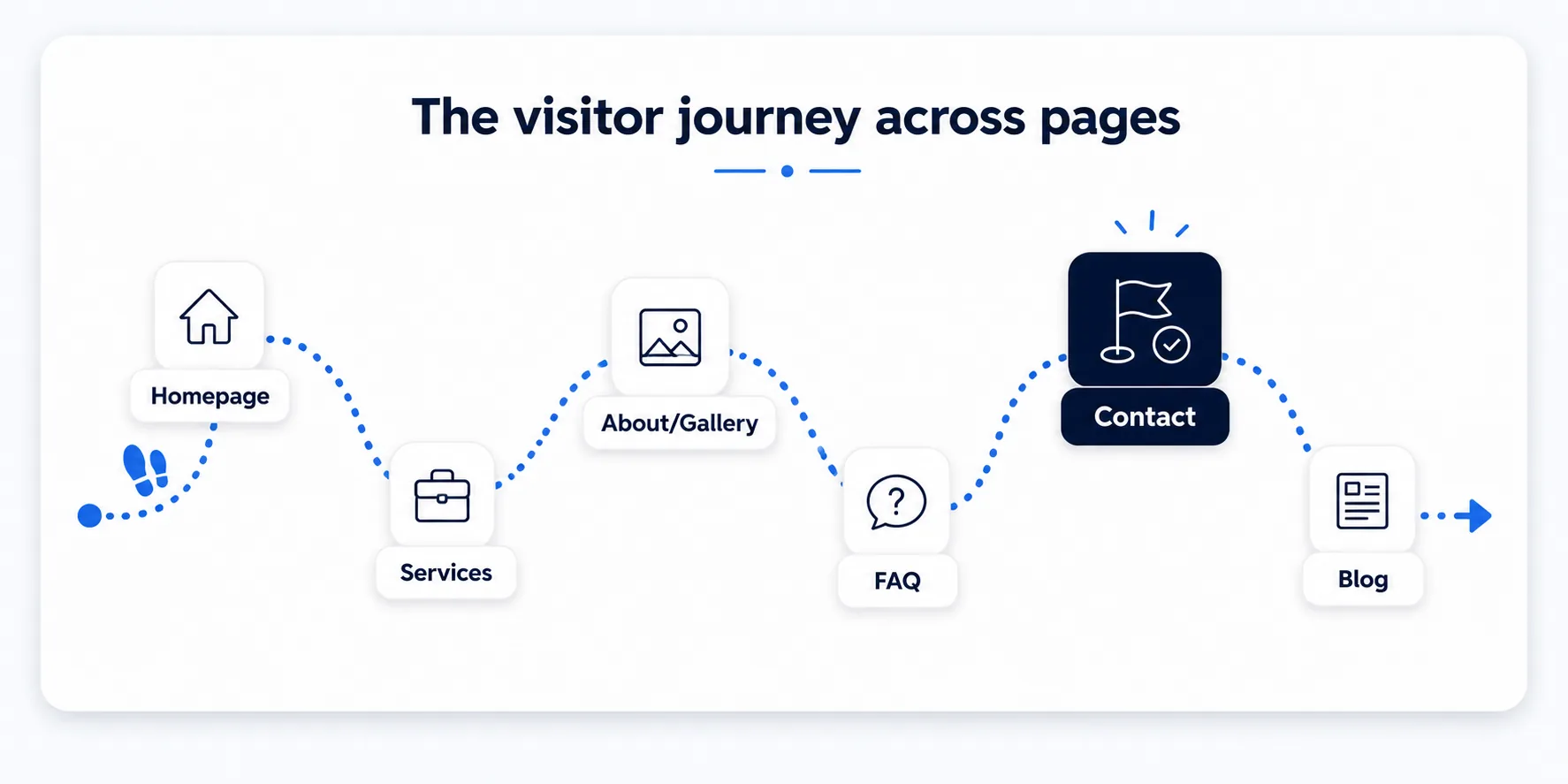
- Homepage — first impression: what is this, who is it for, what next?
- Services — persuades: can this business solve my specific problem?
- About / Gallery — builds trust: proof, credibility, real work shown
- FAQ — removes hesitation: answers the objections before they’re asked
- Contact — converts: the frictionless final step
- Blog — attracts new visitors over time via search
Common Mistakes
- Building a page just because "every website has one," without a clear purpose or intended visitor action.
- Overloading the homepage trying to say everything at once instead of summarizing and funnelling toward the next step.
- Skipping legal pages (Privacy Policy, Terms) even when the site collects personal data through forms.
Tools to Use
Sitemap planning tools (or a simple spreadsheet)
Map every planned page and its single job before building anything.
Competitor site audits
See which pages competitors rely on most, and which ones they skip entirely.
Heatmap tools (Hotjar, Microsoft Clarity)
See where real visitors actually click and scroll on each page once live.
POPIA / GDPR policy generators
Free tools to draft a compliant Privacy Policy and Terms page.
Key Takeaways
- Every page should have one clear, primary purpose — avoid pages that exist just because "every website has one."
- The homepage introduces, the services page persuades, the contact page converts, and the blog attracts new visitors over time via search.
- Legal pages (Privacy Policy, Terms) aren’t optional extras — they’re often a legal requirement once you collect any visitor data.
- Think of a website’s pages as a connected journey, not a random collection of documents.
Practical Exercises
- Sketch a simple sitemap for a fictional local business. For each page, write one sentence describing its specific job and what action you want a visitor to take before leaving it.
Want "Website Pages" done for you, not just explained?
We build fast, mobile-first websites for South African local businesses — putting everything in this chapter into practice, professionally.