
Databases
What lets a website remember instead of just display.
A website without a database can only ever show the same fixed content to everyone. A website with a database can remember: a customer’s booking, a user’s saved preferences, or thousands of product listings that update independently of the website’s code.
Beginner Explanation
At a basic level, a database organizes information into structured records, similar in spirit to a well-organized spreadsheet, but built to handle much larger volumes of data, many simultaneous users, and complex relationships between different types of information — reliably and quickly. Common categories of data a business website typically needs to store include users, products, bookings, messages, orders, blog posts, and customer details.
MySQL and PostgreSQL are relational (SQL) databases — they organize data into tables with defined columns and strict relationships between them (a customer has many orders; an order belongs to one customer), queried using SQL. Relational databases excel when data has clear, consistent structure and relationships that matter, which is why they remain the default choice for most business applications. MongoDB is a NoSQL database that stores data as flexible, document-like records instead of rigid tables, suiting data that varies in shape or evolves quickly during early development.
Firebase and Supabase are "Backend-as-a-Service" platforms that bundle a database together with authentication, file storage, and hosting for backend logic — Firebase uses a NoSQL document model, while Supabase is built on top of PostgreSQL. For beginners and small teams building quickly, these platforms are especially popular because they remove much of the server-management burden from Chapter 9. A beginner’s first database is usually a single table storing form submissions; an expert designs a full data model in advance — deciding what tables are needed, how they relate, and how to keep that data secure (Chapter 15) even as it grows into the thousands or millions of records.
Real Business Examples
A single "quote requests" table
The simplest real-world database: one table, one row per form submission, with columns for name, phone, service, and date — enough for most small local businesses to start with.
A restaurant’s live menu
Menu items live in a database instead of hardcoded in the website’s files, so the owner can update a price or mark a dish "sold out" instantly, without touching any code.
Bookings and customers, related
A salon’s database links each booking to a specific customer record, so the owner can instantly see a client’s full history the next time they call.
Visual Diagram
Relational data, visualised
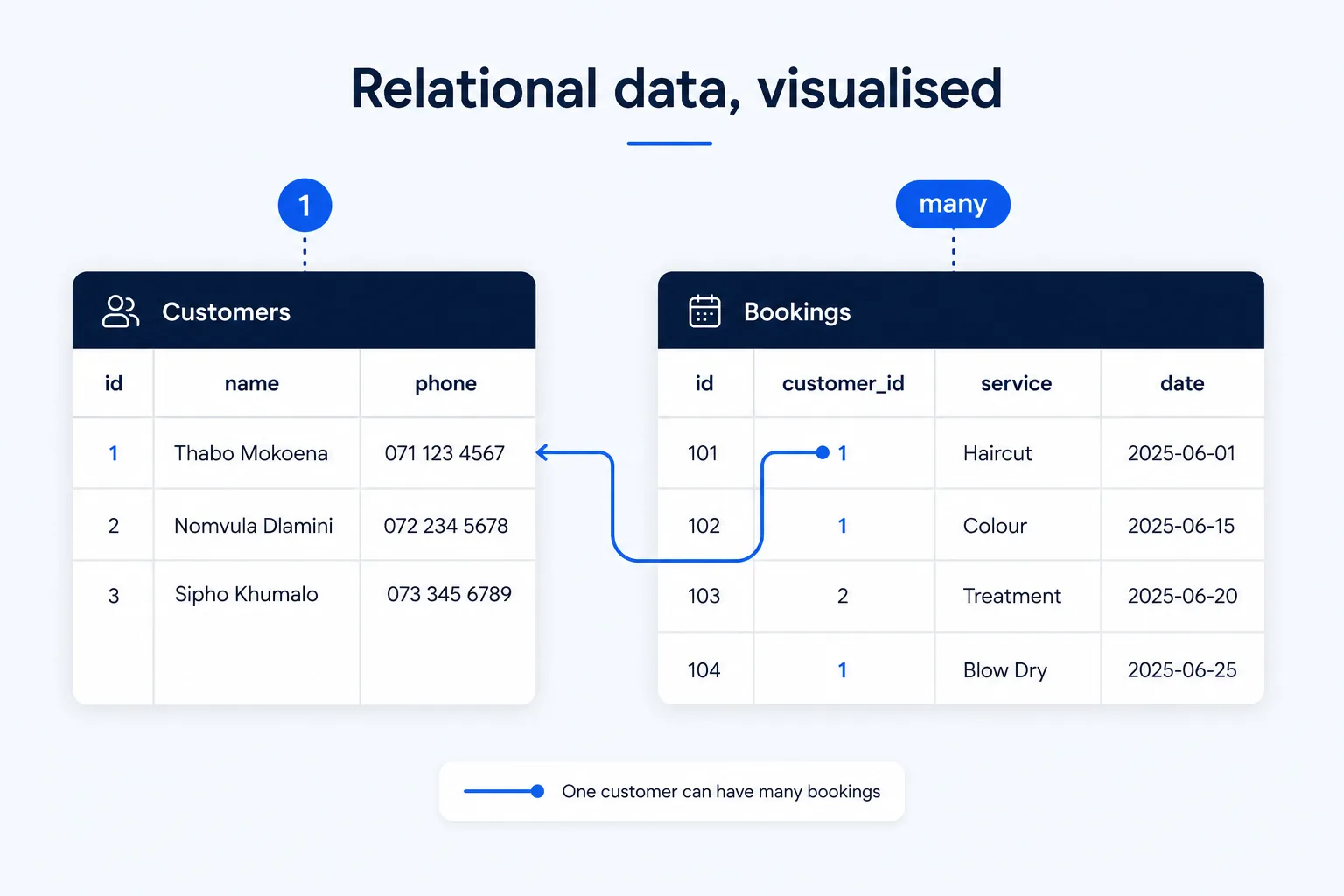
- Customers table — id, name, phone, email
- Bookings table — id, customer_id, service, date, status
- The relationship — each booking’s customer_id points back to exactly one row in Customers
- One customer can have many bookings; one booking belongs to exactly one customer
Common Mistakes
- Storing everything in one giant table instead of separate, related tables — making data messy and hard to update consistently.
- Choosing a database technology because it’s trendy rather than because it fits the project’s actual data and relationships.
- Skipping the data-modelling step and designing the database structure only after code has already been written around it.
- Never planning which fields must never be empty, leading to incomplete or unreliable records down the line.
Tools to Use
Supabase
PostgreSQL-based backend-as-a-service, popular for fast-moving small business projects.
Firebase
Google’s NoSQL backend-as-a-service, bundling database, auth, and hosting together.
PostgreSQL / MySQL
Mature, structured relational databases for projects with clear, consistent data relationships.
A spreadsheet (for planning)
Sketch a data model — tables, fields, and relationships — before writing a single line of database code.
Key Takeaways
- A database lets a website store, update, and recall information over time instead of showing static, unchanging content.
- Relational databases (MySQL, PostgreSQL) use structured tables with defined relationships; NoSQL databases (MongoDB) use flexible, document-style records.
- Firebase and Supabase bundle a database with authentication and hosting, which is popular for fast-moving or smaller projects.
- Plan your data model — what tables/collections you need and how they relate — before writing code, not after.
Practical Exercises
- Design a simple data model for a booking system: list the fields you’d need in a "Bookings" table and a "Customers" table, and describe in one sentence how the two tables relate to each other.
Want "Databases" done for you, not just explained?
We build fast, mobile-first websites for South African local businesses — putting everything in this chapter into practice, professionally.